
Contact View Free2.5.15 - Get APK
You'll be able to download in few seconds.
Publisher Description
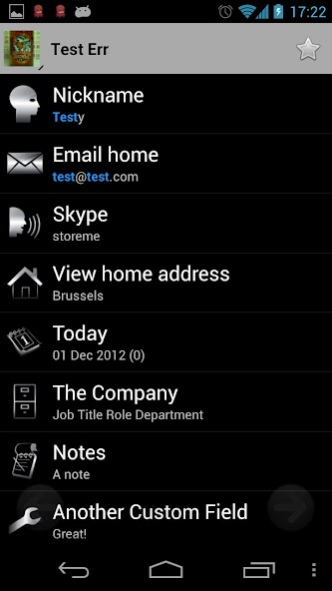
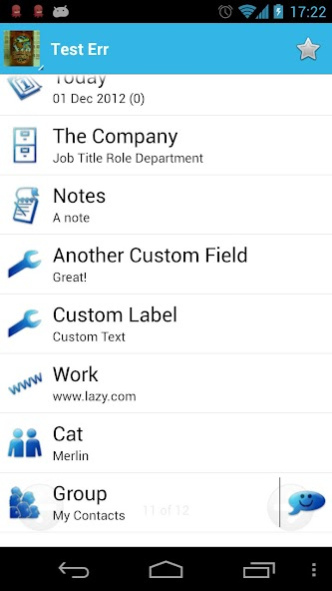
View your contact's details in a clear format allowing you to see, for example, all the address and note details.
Details
=========================
This application works on any phone with OS 2.1+, but is especially useful for owners of a HTC device if they want to view full contact details.
It's not a replacement for the built-in Contact Manager. It's purely to view the contact details in a clearer format.
Tablet Users/ HTC users
=========================
If you are using a tablet with OS 4.0 or greater and NOT any of the Contact Lookup applications, then you won't be able to use this application as the default people application does not allow you to view contacts with another application. This also affects some later HTC devices (e.g. HTC Desire X OS4.0.4)
Instructions
=========================
To use Contact View either run the Contact Lookup applications and press on the contact result or view a contact from the default contact manager.
Contact Lookup Pro and Contact Lookup Fast can use this view as the default via a preference in the menu settings. Initially users of these applications may have to LONG-PRESS to see Contact View. These users also have access to the settings menu.
Supports more fields than the stock contacts view, including:
- Name
- Nickname
- Phone number
- Email address
- Instant Messaging (chat)
- Organisation
- Events
- Relationships
- Websites
- Groups
- Gmail Custom Fields
Highlighted Search Text
=======================
If you use Contact View with Contact Lookup Pro/Fast, then any search text is highlighted in Contact View.
HTML in Notes
=========================
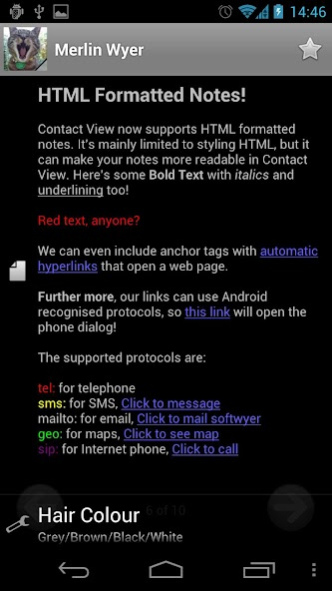
Simple HTML used in notes is rendered correctly allowing colours, styles and clickable links.
Actions
=========================
You can press the list elements for some context sensitive actions if these are supported by your device. This includes dialling, SMS, chat (IM), email, websites and maps integration.
Pressing a group can Email or SMS the group members. (Needs Contact Lookup Pro or Fast version)
Long-pressing an item will copy the data to the clipboard.
If you press the contact name banner, it will open the default contact edit application.
If you press the contact's favourite star, it will open the default contact view from where you can set the favourite status.
Swipe left or right to page through the results of the search from Contact Lookup Application screen. You can also use the left and right icons. You can also do this via the Quick Search Box, but due to limits imposed by QSB you will only see a maximum of ~50 records.
Long-pressing on the arrows will move to the start or end of the contacts. This can be configured from the menu to move 5, 10, 25 or 50 pages.
Tips
=========================
Some devices do not allow relationships to be entered directly on the device. However, you can enter this detail using the Gmail contact editor on the web. Access your web based Gmail account here -> https://mail.google.com
Contact Lookup (free) Limitations:
=========================
- Max 20 contacts in the view.
- Adverts
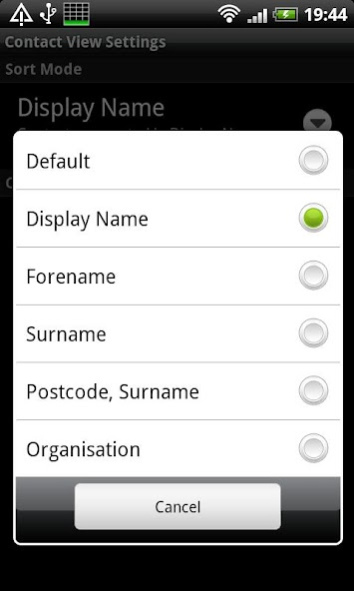
- Cannot choose to override the default sort.
- Cannot set the theme
- No access to the settings menu
Users of Contact Lookup Pro or Contact Lookup Fast do not have these limitations.
Can't view Contact Details?
=========================
If you've tried to view a contact's details using your native contacts application, and have not been prompted to use Contact View, then you will need to clear the application defaults FOR YOUR CONTACT APPLICATION (i.e People, Contacts, etc.) Read this for a detailed explanation on how to do this -> http://www.howtogeek.com/howto/43135/how-to-change-the-default-application-for-android-tasks/
Required Permissions:
=========================
INTERNET - To enable the display of adverts.
CALL_PHONE - To enable one-touch dialling
READ_CONTACTS - To show the contact data
About Contact View Free
The company that develops Contact View Free is SoftWyer. The latest version released by its developer is 2.5.15.
To install Contact View Free on your Android device, just click the green Continue To App button above to start the installation process. The app is listed on our website since 2019-02-23 and was downloaded 0 times. We have already checked if the download link is safe, however for your own protection we recommend that you scan the downloaded app with your antivirus. Your antivirus may detect the Contact View Free as malware as malware if the download link to com.softwyer.contactview is broken.
How to install Contact View Free on your Android device:
- Click on the Continue To App button on our website. This will redirect you to Google Play.
- Once the Contact View Free is shown in the Google Play listing of your Android device, you can start its download and installation. Tap on the Install button located below the search bar and to the right of the app icon.
- A pop-up window with the permissions required by Contact View Free will be shown. Click on Accept to continue the process.
- Contact View Free will be downloaded onto your device, displaying a progress. Once the download completes, the installation will start and you'll get a notification after the installation is finished.
Program Details
System requirements
Download information
Pricing
Version History
version 2.5.15
posted on 2019-02-23
v2.5.15
+ Remove call permission
v2.5.14
+ Fix shortcut creation on Android Oreo
v2.5.13
+ Rebuild against new libraries to see if it fixes scrolling issues
v2.5.12
+ Long pressing on the header will prompt for the contact application to use.
v2.5.11
+ Custom fields are in their own group and not sorted.
v2.5.10
+ Fix a crash on startup (thanks Petr)
v2.5.9
+ Fixed bugs in sorting.
More details here https://plus.google.com/113750147836457488590
version
posted on 2016-12-07
v2.5.12,Long pressing on the header will prompt for the contact application to use.,v2.5.11,Custom fields are in their own group and not sorted.,v2.5.10,+ Fix a crash on startup (thanks Petr),v2.5.9,+ Fixed bugs in sorting.,v2.5.8,+ Multiple search terms shown with different colours,+ Bug fixes,v2.5.6,+ Create desktop shortcuts on contacts to open either in CV or Android's Quick Contact View.,More details here https://plus.google.com/113750147836457488590
version 1.6.2
posted on 2011-02-13
Several fixes and updates
Disclaimer
External Download
We do not host Contact View Free on our servers. We did not scan it for viruses, adware, spyware or other type of malware. This app is hosted by Galad and passed their terms and conditions to be listed there. We recommend caution when installing it.
The APK Download link for Contact View Free is provided to you by apps112.com without any warranties, representations or guarantees of any kind, so access it at your own risk.
If you have questions regarding this particular app contact the publisher directly. For questions about the functionalities of apps112.com contact us.
